
Request operations · SW009
Build a privacy request inbox with a clear next action
Build a privacy request inbox that identifies the requested outcome, assigns a next action and keeps verification, retention and response decisions visible.
Research cutoff: . This dated explainer is general information; check the linked instruments and your circumstances before acting.
SWARN is in development. Product workflows described here are design and evaluation guidance; availability depends on the published product status and agreed scope.

A privacy request inbox should tell an operator what to do next. A message labelled “data request” is only the starting point. The person may want an address corrected, an explanation of sharing, promotional messages stopped or a record erased.
Design the intake around the outcome the person is asking for. They should not need to know the correct section number or use the organisation’s internal terminology before someone can understand the request.
Preserve the person’s request before categorising it
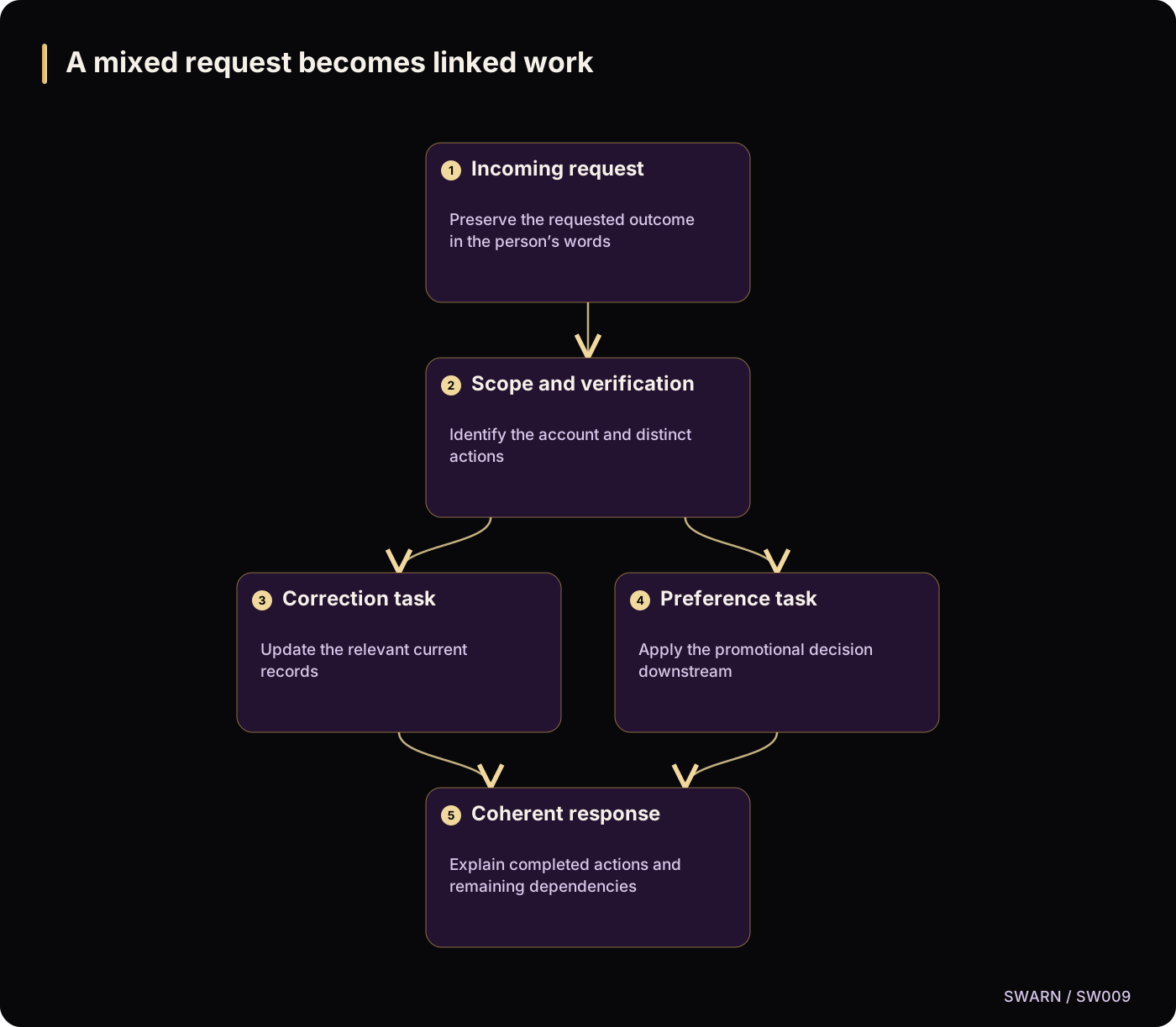
A hypothetical customer writes: “You still have my old address. Please fix it and stop sending offers there.” That message contains at least two operational actions. Treating it as one generic ticket can leave one action unfinished.
Keep the original message in an appropriately protected record. Create separate work items where necessary, linked to the same case. The customer should still receive a coherent explanation rather than several contradictory responses from different departments.
The DPDP Act’s sections 11 to 14 describe access, correction and erasure, grievance redressal and nomination. These are not identical workflows. They belong to the substantive phase scheduled for 13 May 2027 under the commencement notification, as checked on 22 October 2026.
Use the distinction to prepare your operations. Do not import every right or response deadline from another privacy regime and label it a DPDP requirement.
Give every case a visible next action
An inbox row should show the requested outcome, current owner, relevant system or business area, the next action and any dependency preventing progress. A generic status such as “in progress” often hides the most useful information.
Prefer states that explain the work: awaiting proportionate verification, locating records, reviewing retention, awaiting processor response, preparing explanation or completed. Each state should have an exit condition. For example, “awaiting processor response” ends when the recipient supplies sufficient evidence, not when someone sends a reminder.
Do not force sensitive details into the list view. A case reference and a concise description may be enough. Limit full request content and supporting evidence to people who need them.
The OWASP Authorization Cheat Sheet recommends consistent permission checks. Apply them to the case list, attachments, search, exports and direct links. An intake system can otherwise become a new way to browse customer information.
Separate time tracking from legal assumptions
Record when the request arrived and when the organisation took each meaningful action. Use an internal target appropriate to the workflow and applicable requirements. Mark the source of the target so staff know whether it comes from law, contract or operating policy.
The final DPDP Rules, rule 14(3), provide for a published reasonable grievance-response period no longer than ninety days. That is not a universal ninety-day allowance for every access, correction or erasure request. Existing applicable requirements may also differ.
If a case is waiting for another team, do not make elapsed time disappear. Escalation should identify both the waiting state and the action needed from the dependency owner. Reassigning the ticket should not reset its history.
Work a mixed request through the inbox
For the hypothetical address-and-offers request, the operator first checks whether the sender can be connected to the relevant account through the approved verification process. The correction work then identifies where the old address remains, while the preference work examines the promotional purpose and sending systems.
If an invoice must retain a historical delivery address, the response should distinguish that record from the current address used for future deliveries. The team should assess the reason for retention rather than silently replacing every historical value or refusing the entire request.
The case can show two outcomes: current contact details corrected, and promotional eligibility updated. If a processor has not confirmed the second action, that dependency remains open. The customer-facing status should not claim full completion.
Build the inbox around useful decisions
Before the workflow goes live, check:
- Can staff recognise mixed requests and create linked actions?
- Does every open state have an owner and exit condition?
- Are verification and retention decisions recorded separately?
- Are sensitive attachments protected outside the list view?
- Is the response target tied to a documented source?
- Can processor delays be escalated without losing history?
- Does closure require an accurate explanation of the outcome?
Review a small sample of completed synthetic cases before adding automation. Ask a colleague to reconstruct what was requested, what was done and what remains. If they cannot answer those questions from the record, improving the inbox’s labels and decision fields is likely to matter more than adding another dashboard chart.
A mixed request becomes linked work
Text version of the diagram
- Incoming request: Preserve the requested outcome in the person’s words
- Scope and verification: Identify the account and distinct actions
- Correction task: Update the relevant current records
- Preference task: Apply the promotional decision downstream
- Coherent response: Explain completed actions and remaining dependencies
- Incoming request → Scope and verification
- Scope and verification → Correction task
- Scope and verification → Preference task
- Correction task → Coherent response
- Preference task → Coherent response
Sources and reading context
These references support the original 22 October 2026 research. Source links and the date above make the scope of this article explicit.
- Digital Personal Data Protection Act, 2023 · Sections 11 to 14
Different individual-rights workflows
- Commencement notification for provisions of the DPDP Act · Paragraph (c)
Substantive commencement timing
- Authorization Cheat Sheet · Permission checks
Protect intake and evidence access
- Digital Personal Data Protection Rules, 2025 · Rule 14(3)
Grievance-response period distinction