
Data inventory · SW013
Map the personal data in a single spreadsheet workflow
Map a spreadsheet workflow by tracing its inputs, fields, users, exports and disposal decisions, then use the map to resolve a concrete privacy risk.
Research cutoff: . This dated explainer is general information; check the linked instruments and your circumstances before acting.
SWARN is in development. Product workflows described here are design and evaluation guidance; availability depends on the published product status and agreed scope.

A spreadsheet is often described as one data store even when it performs several jobs. It may start as a booking list, become a payment tracker and later supply a promotional audience. Mapping only the file name misses those changes in purpose.
Choose one spreadsheet and follow a single record through its working life. The exercise should show where the information came from, who can use it, where copies go and what eventually happens to them.
Start with the input, not the column headings
In a hypothetical language-training centre, staff copy enquiries from a website form into a shared admissions spreadsheet. Some rows also come from telephone conversations and walk-in visitors. The same columns therefore contain information collected through different interactions.
Record those sources separately. For each, identify the explanation given to the person and the purpose for which the information was supplied. A populated cell does not establish that every later use is appropriate.
The DPDP Act’s definitions describe personal data by identifiability and processing through activities that include storage, use and sharing. Those definitions help the team recognise that the spreadsheet’s lifecycle matters, not merely its initial collection.
Do not paste real customer rows into the mapping document. Use field names and synthetic examples where possible, with controlled access to any evidence that requires actual records.
Follow one record through the working day
For the training centre, a record might move from enquiry to counselling, course registration and payment follow-up. The staff member who handles an enquiry may need contact details and course preference. A colleague checking payments may need a different subset.
Write the action beside the information it needs. This exposes columns that are convenient to copy but unnecessary for the task. It also reveals informal practices, such as putting medical explanations or family details into a general remarks field.
Ask the team to show its real operating steps using fabricated data. Which filter do they apply? What do they copy into email? Which sheet is downloaded for a weekend event? Observation of the proposed or existing process is more reliable than assuming the file has only one use.
Treat every export as another destination
A downloaded copy can outlive the shared spreadsheet’s permissions and corrections. Map the export’s recipient, purpose, storage location and owner. Include recurring exports and one-off attachments.
For the hypothetical centre, the admissions team may send a list to a visiting trainer. The trainer might need participant names and course details, while telephone numbers remain unnecessary. This is a decision to make before the export is created.
Avoid treating hidden columns or a filtered view as the whole access-control design. The OWASP Authorization Cheat Sheet recommends enforcing permissions consistently. Use a sharing method that gives the recipient only the information and actions authorised for the task.
Where a spreadsheet supports several purposes, consider whether separate controlled outputs would make those boundaries easier to maintain.
Record the end of the workflow
Ask what happens when an enquiry closes or a course ends. The answer may differ by record class. Some information may support an ongoing relationship, some may have an applicable retention requirement, and some may no longer be needed.
The mapping exercise should identify the decision owner and the relevant policy. It should not invent a universal retention period or instruct staff to destroy records without checking their obligations.
Include copies in the question. Deleting a row from the main file does not explain what happened to an emailed attachment, a local download or a previous export. The team needs a practical way to communicate and verify the applicable action.
Use a small map with actionable fields
For this workflow, a useful inventory row can contain:
| Inventory field | Example description |
|---|---|
| Source | Website course enquiry |
| Information | Contact details and selected course |
| Purpose | Respond to the enquiry |
| Working location | Shared admissions spreadsheet |
| Authorised users | Named admissions roles |
| Output | Restricted trainer list |
| End decision | Owner and approved retention rule |
The examples describe a proposed inventory, not a required statutory template. Add detail when it changes a decision; avoid turning the map into a second copy of the customer database.
Finish by resolving one issue
Choose one finding the team can act on: remove an unnecessary export column, limit a recipient’s access, replace a free-text note with a narrower field or assign ownership of old downloads.
Before closing the exercise:
- Confirm all input channels are represented.
- Separate distinct uses of the same file.
- Identify the actual users and recipients.
- Trace exports beyond the main spreadsheet.
- Record an owner for retention and correction decisions.
- Test one improvement with synthetic records.
The map is useful when a colleague can follow it to the next system or person. Keep it close to the workflow so later changes to forms, exports or staff access can update the same record.
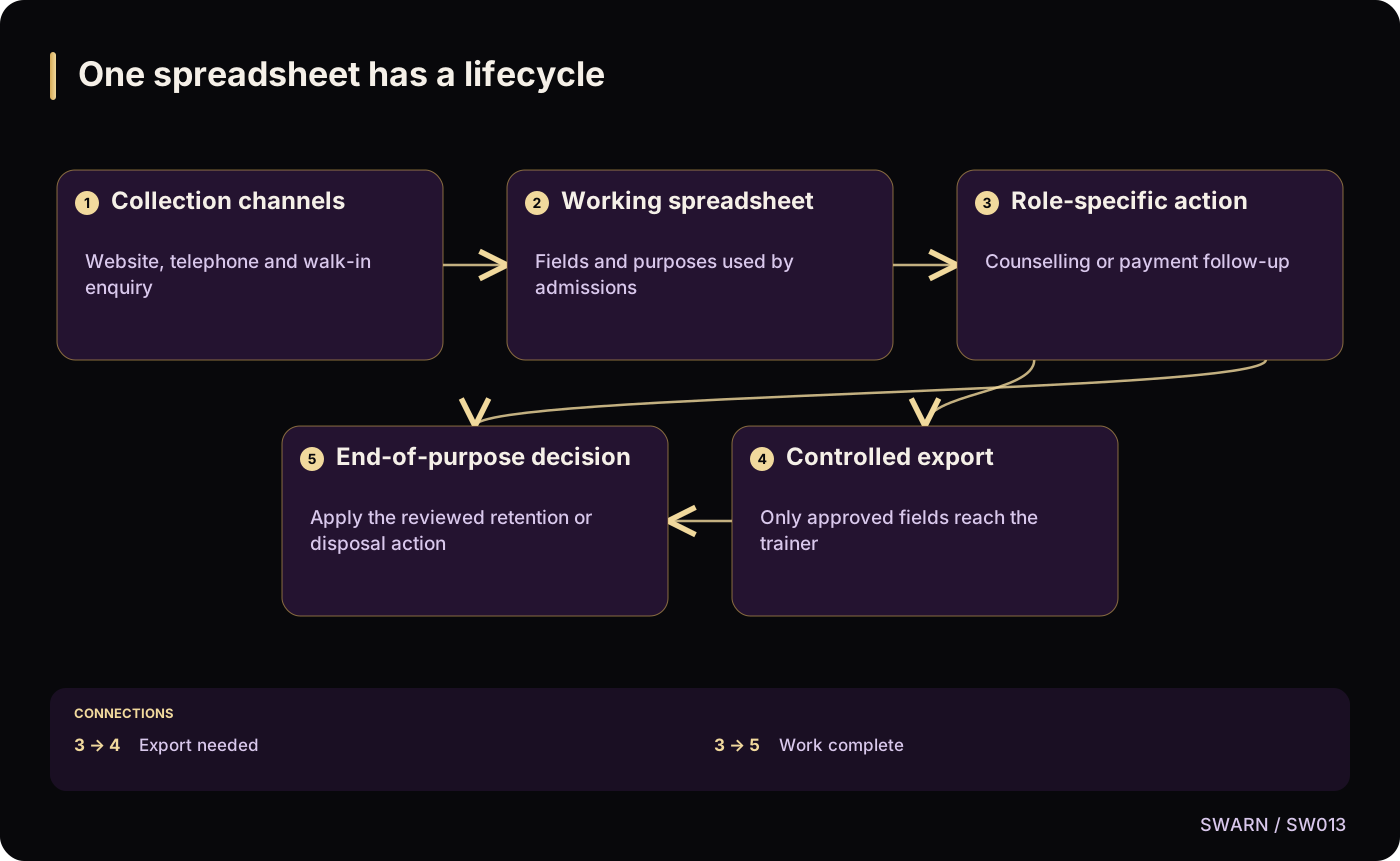
One spreadsheet has a lifecycle
Text version of the diagram
- Collection channels: Website, telephone and walk-in enquiry
- Working spreadsheet: Fields and purposes used by admissions
- Role-specific action: Counselling or payment follow-up
- Controlled export: Only approved fields reach the trainer
- End-of-purpose decision: Apply the reviewed retention or disposal action
- Collection channels → Working spreadsheet
- Working spreadsheet → Role-specific action
- Role-specific action → Controlled export: Export needed
- Role-specific action → End-of-purpose decision: Work complete
- Controlled export → End-of-purpose decision
Sources and reading context
These references support the original 22 October 2026 research. Source links and the date above make the scope of this article explicit.
- Digital Personal Data Protection Act, 2023 · Sections 2(t), 2(x)
Personal-data and processing definitions
- Authorization Cheat Sheet · Consistent authorisation
Permissions for views and exports