
Redaction engineering · SW023
Test OCR before trusting redaction on scanned documents
Test scanned-document redaction from extraction to the delivered file, including missed text, page coordinates and any remaining embedded content.
Research cutoff: . This dated explainer is general information; check the linked instruments and your circumstances before acting.
SWARN is in development. Product workflows described here are design and evaluation guidance; availability depends on the published product status and agreed scope.

The text detector cannot redact a name that the OCR stage never extracted. This simple dependency is easy to miss when a demonstration shows only clean, typed pages.
A scanned-document workflow has several opportunities to fail: the image may be difficult to read, extraction may be incomplete, the detector may miss an entity, coordinates may point to the wrong area or the exported file may retain content that was supposedly removed. Testing only the detector leaves most of that chain unexamined.
Establish the document boundary
Start with the file types and intake conditions the workflow actually accepts. A single-page image differs from a PDF containing images, selectable text, metadata and attachments. If the pilot accepts only a restricted format, enforce that boundary at intake.
A hypothetical finance team wants to redact personal details from scanned reimbursement forms before sharing them with a process-improvement reviewer. The forms include printed fields, handwritten additions and supporting receipts.
The first pilot could deliberately exclude handwriting if the chosen extraction path has not been evaluated for it. That exclusion must appear in the intake rule and the user-facing outcome. Quietly processing unsupported pages would turn a stated limitation into a hidden failure.
Test extraction before detection
Build fixtures with known text and known locations. Include realistic variations in skew, contrast, cropping, print size and page layout. Use synthetic or otherwise approved content so that failure cases can be retained for regression testing.
Tesseract’s guidance on recognition quality identifies image preparation and page-segmentation factors that affect OCR. It gives reasons to vary document quality; it does not establish an accuracy threshold for your forms.
Compare extracted text with the fixture’s ground truth. Record missing words, substitutions and reading-order problems. Then evaluate entity detection on both the correct reference text and the actual extracted text.
That comparison is useful. If detection works on the reference but fails on extraction, the likely improvement belongs earlier in the pipeline. If it fails on both, the recogniser or entity policy also needs attention.
Check the geometry
Image redaction needs to connect detected text to the area that must be removed. A word spanning several boxes, an address across lines or a rotated page can challenge that mapping.
Inspect whether redaction covers the entire intended value without leaving meaningful fragments. Also check whether it obscures unrelated content that the recipient needs. Evaluate these outcomes on the final rendered page rather than relying solely on coordinates logged during processing.
Presidio’s image-redaction documentation describes combining OCR, text detection and image redaction. The documentation also identifies limitations and a beta maturity warning. Treat those as reasons for a bounded pilot and explicit validation, not as a statement of production readiness.
If the pipeline uses an external OCR service, include that service in the data-flow review. The first remote transfer may happen during extraction, before the redaction you intended to perform.
Inspect what the recipient receives
An opaque overlay is not sufficient evidence that underlying content has been removed. Test the actual file as the recipient can access it: viewing, text selection, search and permitted extraction.
Where the format can contain metadata, layers or attachments, include those surfaces in the output specification. If the system exports a flattened image, verify the image and any additional packaged files. A clean preview of one page does not establish that the whole package is clean.
Do not use the redacted file’s appearance as the only test result. Preserve an approved fixture, expected redaction regions, the processing configuration and the final output so that a second reviewer can reproduce the inspection.
Decide what happens to doubtful pages
A workflow needs a route for unreadable, incomplete and unsupported inputs. Possible decisions include asking for a clearer scan, restricting the output audience or sending the page for authorised manual review.
The release checklist should cover:
- Accepted document formats and excluded content are enforced.
- Extraction, detection and rendering errors have separate categories.
- Test fixtures include the intake conditions allowed in the pilot.
- Final-file inspection covers visible and relevant embedded content.
- Uncertain pages receive an explicit outcome instead of silent success.
- Originals, temporary files and review copies have defined access and retention.
A successful pilot provides evidence for a particular document path. It does not prove that any scanned document can be safely redacted. Keep the unsupported cases visible to the people operating the workflow.
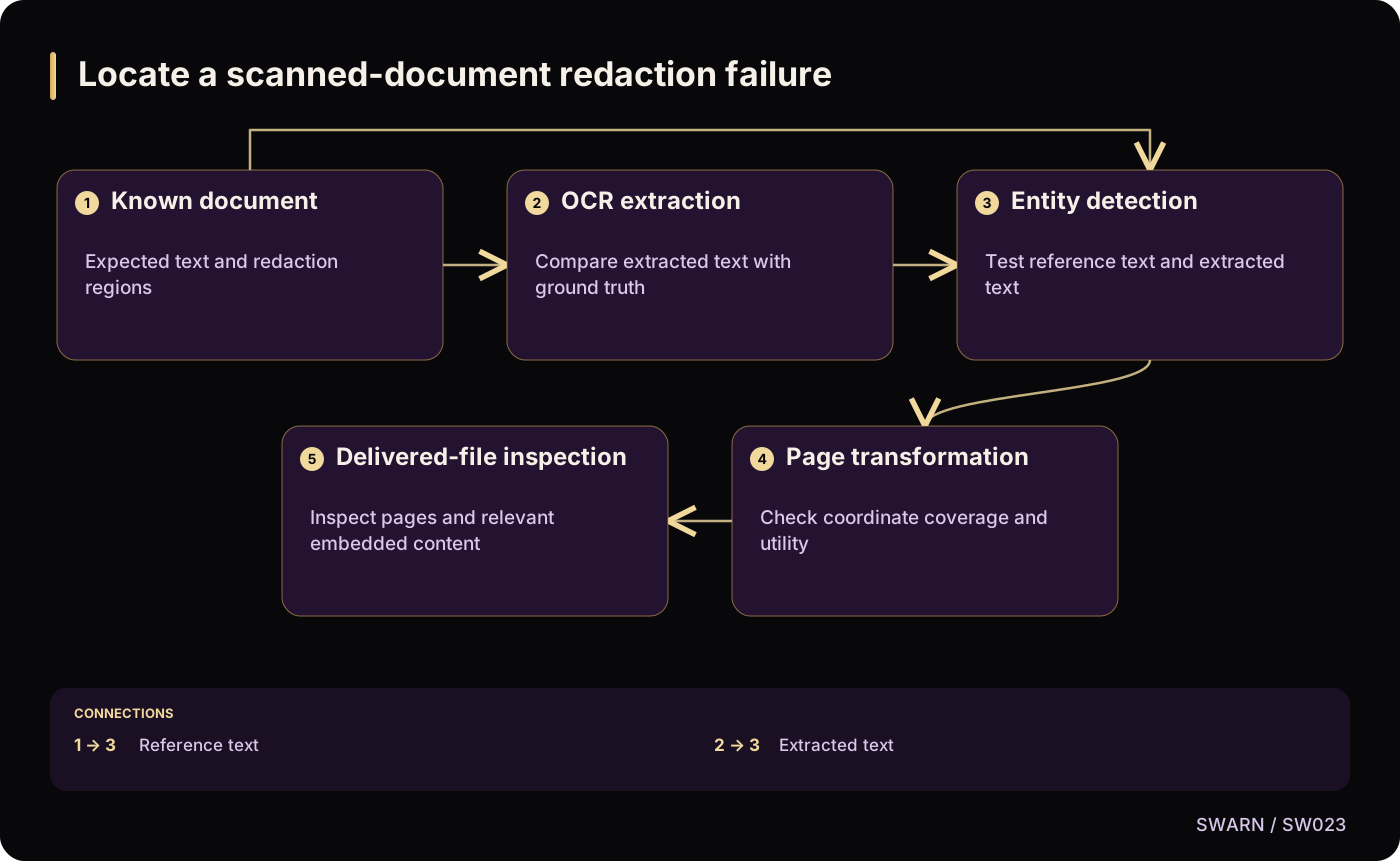
Locate a scanned-document redaction failure
Text version of the diagram
- Known document: Expected text and redaction regions
- OCR extraction: Compare extracted text with ground truth
- Entity detection: Test reference text and extracted text
- Page transformation: Check coordinate coverage and utility
- Delivered-file inspection: Inspect pages and relevant embedded content
- Known document → OCR extraction
- Known document → Entity detection: Reference text
- OCR extraction → Entity detection: Extracted text
- Entity detection → Page transformation
- Page transformation → Delivered-file inspection
Sources and reading context
These references support the original 22 October 2026 research. Source links and the date above make the scope of this article explicit.
- Improving the quality of the output · OCR image preparation and segmentation
Supports varying extraction conditions
- Presidio Image Redactor · Image redactor architecture and limitations
Supports the OCR, detection and image-redaction sequence and bounded maturity statement