
Workflow design · SW004
Designing a privacy exception queue that people will use
Design a privacy exception queue with clear reasons, safe context, accountable reviewers and closure evidence so difficult cases receive useful action.
Research cutoff: . This dated explainer is general information; check the linked instruments and your circumstances before acting.
SWARN is in development. Product workflows described here are design and evaluation guidance; availability depends on the published product status and agreed scope.

An exception queue should help someone make the next decision. If it merely collects everything an automated process could not finish, it becomes an archive of uncertainty. The customer waits, the operator searches for context, and the original processing may continue without a deliberate decision.
Design the queue around a small number of recognisable problems. A requester’s identity is uncertain. A document cannot be read. A destination rejected an update. Two records disagree. Each problem needs different evidence and often a different reviewer.
Give the exception a reason that changes the action
Avoid categories such as “privacy error” or “manual review required” on their own. They describe the system’s discomfort without telling a person how to proceed.
For a proposed queue, use reasons that support decisions: identifier mismatch, missing purpose evidence, unreadable attachment, unavailable destination or conflicting retention requirement. Allow a reviewer to correct the category, while preserving the original event and the explanation for the change.
Do not assume that every exception is a suspected breach or that every uncertain match should be approved. Define urgency according to the potential consequence and the state of the affected processing. A failed promotional suppression and an unclear archive label may require different immediate action.
NIST’s privacy-engineering guidance treats manageability as a system capability. A queue contributes to that capability only when staff can understand the problem and cause an appropriate change.
Supply enough context without copying the dossier
A reviewer commonly needs the request reference, affected purpose, relevant system, reason for failure and the action already attempted. They may not need the customer’s full identity document, complete message history or entire account export.
Keep sensitive supporting material in a controlled location and provide access only when the review requires it. The queue can show a safe summary and a link to authorised evidence. This also makes it easier to apply separate retention rules to operational events and supporting documents.
OpenTelemetry’s sensitive-data guidance recommends collecting information that serves a defined observability purpose. The same minimisation question is useful for exception records: which field changes the decision, and which field merely makes the record look complete?
Internal identifiers and summaries can still identify people. Treat them according to their actual use and access risk rather than declaring them harmless because they are metadata.
Walk through one hypothetical case
Imagine a repair shop that records a customer’s withdrawal from promotional messages. The messaging service returns “contact not found”, while the shop’s spreadsheet shows two rows with similar names and different telephone numbers.
The queue should not ask the reviewer to choose the most plausible row and move on. It should show the affected preference, the identifiers used for the attempted update and the reason that automatic matching stopped. The reviewer follows an approved matching procedure or asks for proportionate clarification.
While the case remains open, the team needs an explicit rule for the affected promotional workflow. A possible rule is to hold the uncertain records out of the next campaign until eligibility is resolved. The business must consider the scope and consequences of that choice.
Closure requires evidence that the correct record was identified and the receiving system applied the necessary change. An unresolved case stays open with a documented next step and owner. A button labelled “done” is not sufficient.
Limit the authority of the review role
Reviewers should receive the permissions needed for their work. Someone who can classify an exception does not necessarily need to export every customer record or change a retention policy.
The OWASP Authorization Cheat Sheet recommends default denial and permission validation on every request. Apply that principle to review screens, evidence links, bulk actions and administrative APIs. A well-protected main screen is undermined by an unrestricted download route.
Make high-impact overrides visible. Require a reason connected to the decision, restrict who can approve them and preserve the resulting evidence. Do not make a free-text justification a substitute for actual authority.
Check whether the queue is helping
Before launch, rehearse a handful of synthetic cases with the people who will handle them. Ask them to explain the next action without assistance from the designer. Watch where they need to open unrelated systems or ask colleagues for information.
Use this operating checklist:
- Does each reason lead to a concrete next action?
- Is there a named owner and a backup?
- Is the status of affected processing clear?
- Can the reviewer obtain evidence through an authorised path?
- Does closure require a specific result?
- Can recurring causes be sent back to the team that can fix them?
Review ageing and repeated causes together. Closing many tickets quickly is not an improvement if staff simply approve uncertain cases. A useful queue produces defensible decisions and teaches the organisation which parts of the workflow need repair.
An exception should lead to a decision
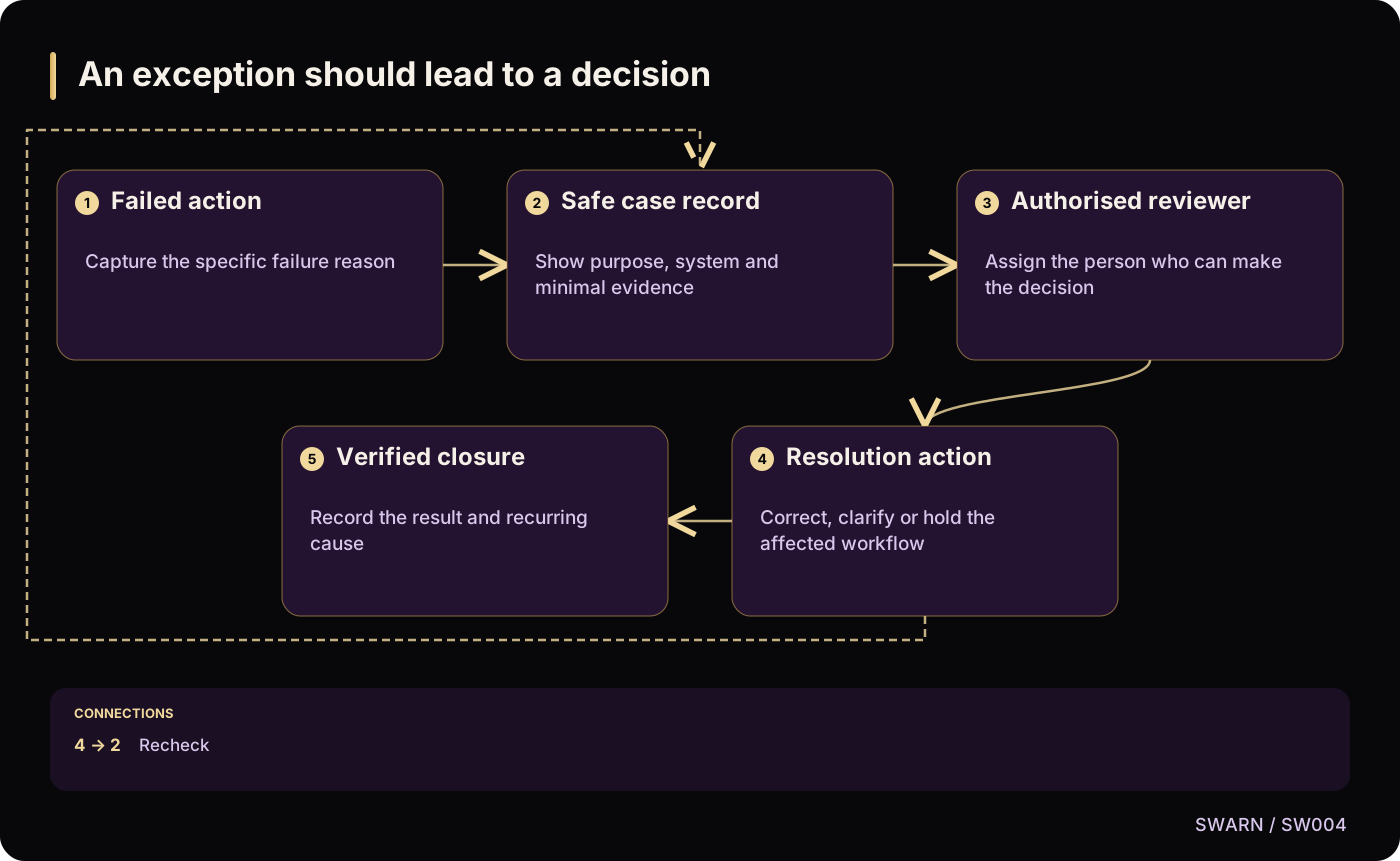
Text version of the diagram
- Failed action: Capture the specific failure reason
- Safe case record: Show purpose, system and minimal evidence
- Authorised reviewer: Assign the person who can make the decision
- Resolution action: Correct, clarify or hold the affected workflow
- Verified closure: Record the result and recurring cause
- Failed action → Safe case record
- Safe case record → Authorised reviewer
- Authorised reviewer → Resolution action
- Resolution action → Verified closure
- Resolution action → Safe case record: Recheck
Sources and reading context
These references support the original 22 October 2026 research. Source links and the date above make the scope of this article explicit.
- NIST IR 8062: An Introduction to Privacy Engineering and Risk Management in Federal Systems · Manageability objective
Practical control over privacy-related decisions
- Handling sensitive data · Data minimisation
Limit operational evidence to useful information
- Authorization Cheat Sheet · Deny by default and validate permissions
Protect reviewer and evidence access