
Pilot adoption · SW046
Help frontline teams adopt a new consent workflow
Help frontline staff use a consent workflow with clear wording, realistic practice and an exception route, without turning opt-in rates into pressure.
Research cutoff: . This dated explainer is general information; check the linked instruments and your circumstances before acting.
SWARN is in development. Product workflows described here are design and evaluation guidance; availability depends on the published product status and agreed scope.

A consent workflow is operated by people who are also serving customers, answering questions and keeping a queue moving. If its instructions are unclear, staff will fill the gaps with their own explanations or shortcuts.
Adoption therefore needs more than a training slide and a new screen. The workflow must make the next action understandable, allow a customer to decline and give staff a practical route for uncertainty.
Teach the decision, not only the clicks
A hypothetical shop introduces a new process for promotional messaging choices at checkout. Staff need to know which purpose the choice concerns, what each option means and how to answer a basic question without improvising a promise.
The training should explain the difference between recording the customer’s choice and persuading the customer to choose a particular option. A successful interaction is an accurately understood and recorded decision.
The DPDP Act’s section 6 sets out the future consent standard: consent must be free, specific, informed, unconditional and unambiguous, with a clear affirmative action. As of 22 October 2026, the relevant core provisions are scheduled for 13 May 2027 under the commencement notification. The training approach here is a readiness design; it should also reflect any current obligations applicable to the business.
Do not use opt-in percentage as the sole measure of staff performance. That can create pressure incompatible with a freely made choice.
Make the interface carry its share of the work
The screen should identify the purpose clearly and present actions that staff and customers can understand. Labels should describe the actual choice rather than relying on colour, position or an unexplained icon.
W3C’s guidance on form labels explains how labels help users understand controls and support assistive technologies. Apply those principles to the relevant customer and operator interfaces.
A short script can help staff introduce the choice consistently, but it should not compensate for a misleading screen. If staff must repeatedly explain what a button really means, revise the interface.
Keep confirmation useful. Show what was recorded and how the customer can ask to change it. Avoid telling staff that a successful click proves every downstream system has already updated unless that is what the system has confirmed.
Practise the uncomfortable cases
Use clearly hypothetical role-play cases before rollout. One customer declines, another asks why the information is needed, another wants to withdraw an earlier choice and another shares a contact detail with a family member.
Include a busy period, an unavailable service and an accidental selection. Ask staff to explain what they would do and which parts of the interface support that decision.
Observe where they hesitate. A repeated question may indicate unclear wording or an ownership gap, rather than inadequate attention during training.
Do not assess staff only on completing the normal path quickly. A person who correctly pauses an ambiguous case may be operating the workflow better than one who clicks through every screen.
Provide an exception route that fits the shift
The route should identify who can help, what information is needed and what the customer can be told while the matter is pending. It should work when the usual manager is absent.
Keep the information collected for an exception proportionate. Staff should not copy identity documents or lengthy customer conversations into an informal group simply because the main system is confusing.
Give the case a reference and a clear next action. If a correction is required, preserve the relationship to the original event rather than silently changing the record.
Feedback from staff should reach the people who own wording, system behaviour and policy. Otherwise the same problem will recur at every counter.
Review adoption through observed behaviour
After a controlled rollout, review synthetic rehearsals and authorised operational evidence. Look for accurate choices, understandable explanations, correct exception handling and reliable handoffs.
Use these questions:
- Can staff explain the purpose in ordinary language?
- Can a customer decline without an improvised obstacle?
- Do staff know how to correct a mistake or receive a withdrawal?
- Does the fallback work during a queue or outage?
- Are uncertain cases routed without unnecessary collection?
- Do recurring questions lead to an actual workflow change?
For SWARN, this describes how a proposed workflow could be introduced while the product is in development. It is not a report of a completed deployment.
Adoption is visible when staff can carry out the process correctly under realistic conditions. The training, interface and escalation route should reinforce the same decision, with the customer’s choice preserved throughout.
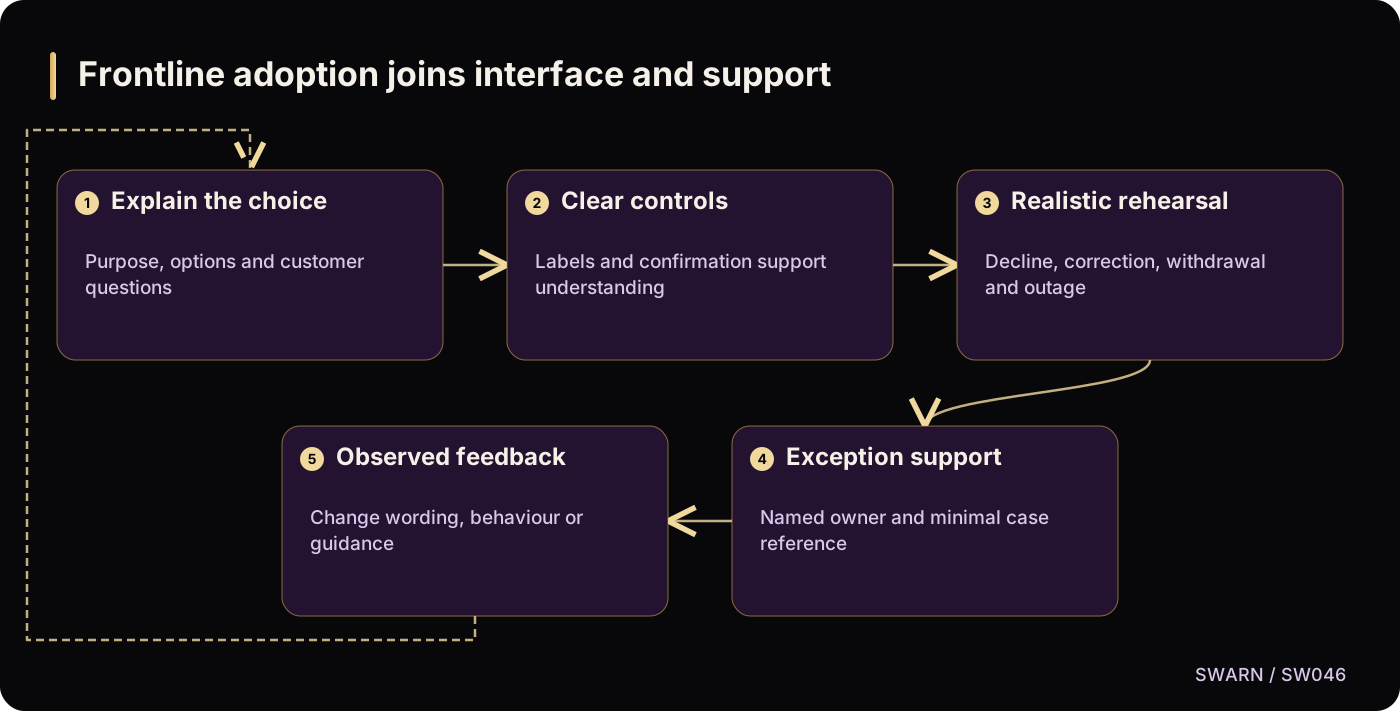
Frontline adoption joins interface and support
Text version of the diagram
- Explain the choice: Purpose, options and customer questions
- Clear controls: Labels and confirmation support understanding
- Realistic rehearsal: Decline, correction, withdrawal and outage
- Exception support: Named owner and minimal case reference
- Observed feedback: Change wording, behaviour or guidance
- Explain the choice → Clear controls
- Clear controls → Realistic rehearsal
- Realistic rehearsal → Exception support
- Exception support → Observed feedback
- Observed feedback → Explain the choice
Sources and reading context
These references support the original 22 October 2026 research. Source links and the date above make the scope of this article explicit.
- Digital Personal Data Protection Act, 2023 · Section 6(1)
Supports the future consent standard
- Commencement notification for provisions of the DPDP Act · Phased commencement
Supports the dated readiness context
- W3C WAI: Labeling Controls · Form labels and accessible controls
Supports meaningful interface labels