
Consent experience · SW005
Designing a consent screen for a busy shop counter
Design a shop counter consent screen that separates purposes, supports a clear customer choice and gives staff a reliable way to handle interruptions.
Research cutoff: . This dated explainer is general information; check the linked instruments and your circumstances before acting.
SWARN is in development. Product workflows described here are design and evaluation guidance; availability depends on the published product status and agreed scope.

A consent screen at a shop counter has to work while a transaction is moving. The customer may be holding bags, sharing a device with staff or reading in a language different from the cashier’s. A technically complete notice can still be difficult to use in those conditions.
Start by deciding what the customer is being asked to choose. Keep the payment or service task understandable, and make any separate promotional choice equally clear. The screen should help the customer understand the consequence of each action without requiring the cashier to improvise an explanation.
Separate the service from the extra purpose
Consider a hypothetical footwear shop that offers an electronic receipt and occasional promotional messages. The customer gives a telephone number for the receipt. That does not, by itself, explain whether the business can use the same number for promotions.
The team should assess the appropriate legal ground for each purpose. Sections 4 and 7 of the DPDP Act distinguish consent from specified certain legitimate uses. Where the business relies on consent, section 6 sets requirements including a clear affirmative action and a specific, informed choice.
These substantive requirements are scheduled for 13 May 2027 under the commencement notification, as checked on 22 October 2026. Designing the screen now is readiness work, alongside any existing applicable obligations.
A useful design gives the receipt task its own explanation and presents promotional participation separately. Do not make the customer infer that declining promotions will cancel a purchase. If a service requires particular information, explain that dependence accurately rather than presenting every field as optional.
Put the decision where the customer can see it
Use labels that describe the choice. “Send offers to this number” communicates more than “I agree”. Link the notice to the actual purpose and data being requested, and provide a route to the fuller explanation without making the first screen meaningless.
W3C’s guidance on labelling controls explains that labels should identify a control’s purpose and be associated with it so assistive technology can present it correctly. Apply that advice to checkboxes, buttons and language selectors. A visual caption floating nearby is not the whole accessibility implementation.
Test the screen on the device used at the counter. Check the reading order, keyboard interaction, touch operation and whether the customer can return from the notice without losing the transaction. A design that works on a developer’s large monitor may behave differently on a shared tablet.
Keep the choice unset until the customer acts. If staff enter a decision on the customer’s behalf, establish a deliberate assisted process with suitable evidence. A cashier tapping through a queue should not silently become the source of every customer’s preference.
Design for interruption
In the hypothetical shop, the customer opens the notice, receives a call and then returns to the payment. What state should the screen retain? What happens if the tablet disconnects after the customer makes a choice? Can the cashier distinguish an unsaved action from a completed record?
Use clear feedback. A proposed interface might show “Your promotional choice has been saved” only after the relevant record is stored. If saving fails, explain what happened and offer the approved fallback. Do not show a success message merely because the button was pressed.
Also consider the next customer. Clear previous personal details and choices when the transaction ends. If the screen remains open during assistance, avoid exposing unnecessary account history. These are practical design decisions to test, not a claim that one layout is mandated by law.
Give staff a short, stable explanation
Staff should be able to describe the choice without adding promises the system cannot fulfil. A small training card can explain the service purpose, the separate optional purpose, how to open the notice and how to handle a refusal or question.
Do not make staff responsible for deciding legal grounds in the moment. The policy and product teams should resolve that before rollout. Staff need an escalation route for cases the approved script does not answer.
Rehearse with synthetic customers who decline, change language, ask for help and abandon the screen. Ask participants what they believe will happen next. Their answer is more informative than whether they managed to tap the intended control.
Counter-ready checks
Before launching, confirm that:
- Each choice has a visible purpose and consequence.
- Unrelated purposes are not bundled into one acceptance.
- The notice remains accessible during the transaction.
- Staff can explain refusal without pressure.
- Saving, failure and completion states are distinguishable.
- The next customer cannot see the previous customer’s details.
- The recorded event matches the choice actually displayed.
A successful counter screen fits the real interaction. It gives the customer a meaningful decision, gives staff an understandable process and gives the business evidence of what occurred.
A counter choice through interruption
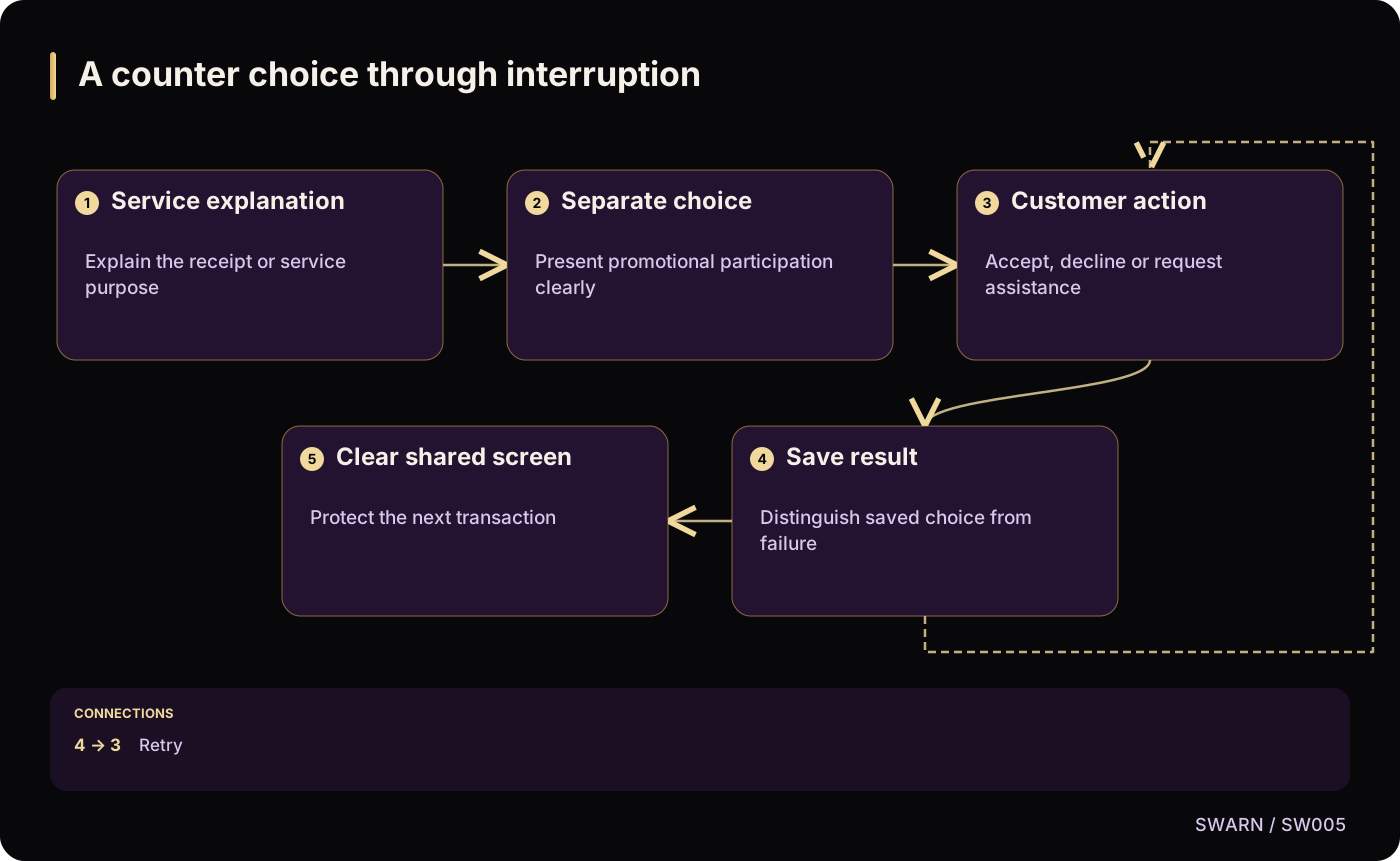
Text version of the diagram
- Service explanation: Explain the receipt or service purpose
- Separate choice: Present promotional participation clearly
- Customer action: Accept, decline or request assistance
- Save result: Distinguish saved choice from failure
- Clear shared screen: Protect the next transaction
- Service explanation → Separate choice
- Separate choice → Customer action
- Customer action → Save result
- Save result → Customer action: Retry
- Save result → Clear shared screen
Sources and reading context
These references support the original 22 October 2026 research. Source links and the date above make the scope of this article explicit.
- Digital Personal Data Protection Act, 2023 · Sections 4, 6 and 7
Purpose-specific grounds and consent requirements
- Commencement notification for provisions of the DPDP Act · Paragraph (c)
Readiness timing
- W3C WAI: Labeling Controls · Labels and control association
Accessible interaction design